Full cleared Minuteman CTF 2025!#
One challenge I liked is chunked, it is a hard forensics challenge.
Description: Bloo keeps corrupting my files! I managed to save bits of a really nice photo I took… but it’s all messed up. Can you recover the original image?
unzipping the artifact yielded 4 corrupted png images. inclusion of corrupted image is intended


If you can’t see the image, you can download the zip file challege.zip#
As you can see in the second image, you can see the starting part of the flag. So initially I started using online repairing of png images, which all yielded no results. Was confused and scratching my head.
Then I stumbled upon this tool called pngcheck when searching for “how to check png for errors” which allowed me to check the images.
running pngcheck on each sample shows these results:
1
2
3
4
5
6
7
8
9
|
pngcheck part0.png
part0.png:  invalid chunk name "ԥE" (ffffffd4 ffffffa5 45 11)
ERROR: part0.png
part1.png:  invalid chunk name ")J)" (29 4a 7f 29)
ERROR: part1.png
part2.png:  invalid chunk name "a��" (61 ffffffb8 16 ffffffc6)
ERROR: part2.png
part3.png:  invalid chunk name "" (00 ffffffe6 ffffffd4 19)
ERROR: part3.png
|
As we can see here, pngcheck showed errors on certain chunks of png.
What the heck is a chunk and why is it corrupted?#
After some research, and reading PNG Structure for Beginners I can understand the PNG format uses chunks (this is how your images can show up partially in webpages), and that corruption in one chunk can render the image un-showable.
Essentially, on a file level, png may look something like this:
1
2
3
4
5
|
MAGIC (used to identify as PNG 89 50 4E 47 0D 0A 1A 0A)
IHDR (critical header chunk, contains information such as dimension/)
PLTE (critical color palette chunk)
IDAT (actual image pixel data, must be consecutive and end with IEND)
IEND
|
While each chunk looks like this:
1
2
3
4
|
4 byte length of it's data
4 byte chunk type (ASCII)
*actual data*
4 byte of CRC (calculated on all preceding data)
|
It is important to keep in mind that each chunk has a CRC, this can be used to check if itself is corrupted.
Sample hexdump:
1
2
3
|
00000000  89 50 4e 47 0d 0a 1a 0a  00 00 00 0d 49 48 44 52  |.PNG........IHDR|
00000010  00 00 0f e7 00 00 09 2f  08 02 00 00 00 91 4d fb  |......./......M.|
00000020  bb 00 00 00 09 70 48 59  73 00 00 0e c4 00 00 0e  |.....pHYs.......|
|
What’s wrong with the images?#
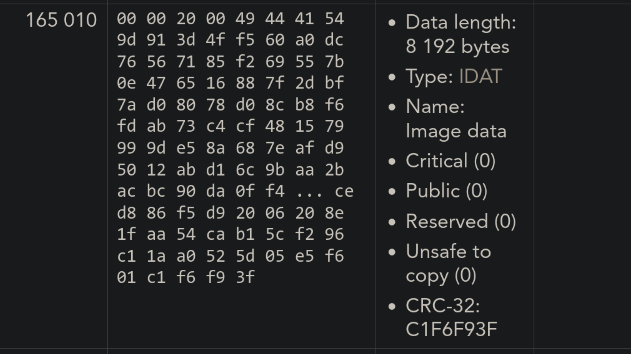
With this information, I started looking online on how to verify PNG chunks. I discovered the PNG File chunk inspector online tool. With this tool, you can see very detailed information about each chunk of a PNG file, including which chunk is corrupted. I uploaded all the images, you can see a sample here.
part0.png
part1.png:
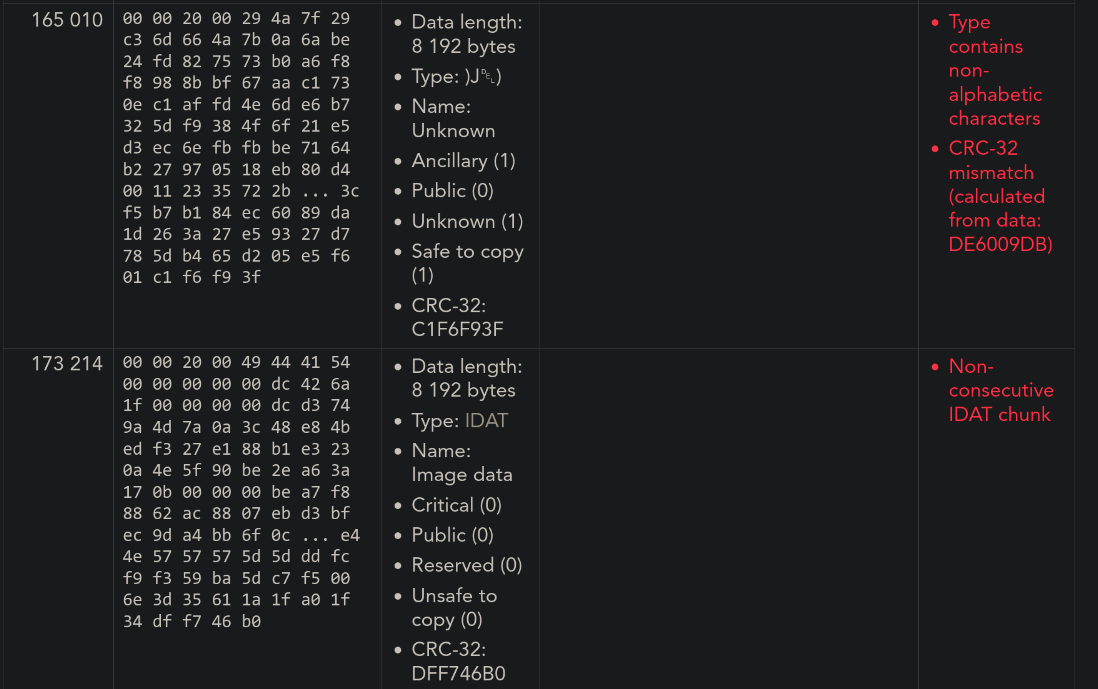
You can see that the tool detects chunk 165 010 as corrupted for part1.png, while the same chunk appears to be normal in part0.png.
How do I recover them?#
I suspected that all of these pngs are essentially the same file but with different chunks corrupted. Which I then verified the hypophysis by uploading all the samples into the chunk verifier. Which I will not show here. This proved my hypophysis correct.
In order to recover the image, I just have to replace all the corrupted chunks with a known-good chunk. I could do this manually, but there were too many, so I needed to write a script.
Writing a PNG parser#
I stumbled upon this blog-post while researching how to write a png parser. Writing a (simple) PNG decoder might be easier than you think
Look simple, let’s borrow and modify this code to parse our images :3
I wrote a read-chunk function like so:
 1
 2
 3
 4
 5
 6
 7
 8
 9
10
11
12
13
14
15
16
17
18
19
20
21
22
23
24
25
|
def read_chunk(f):
    header = f.read(8)
    if len(header) < 8:
        return (False, b"IEND", b"")  # if the image have corrupted IEND chunk, add one

    chunk_length, chunk_type = struct.unpack(">I4s", header)
    if chunk_type not in [
        b"IHDR",
        b"IDAT",
        b"IEND",
        b"pHYs",
        b"iTXt",
    ]:  # we don't care about other non-critical chunks
        f.seek(chunk_length + 4, 1)  # skip chunk data + crc
        return (False, chunk_type, b"")

    print("Reading chunk:", chunk_type, "length", chunk_length)
    chunk_data = f.read(chunk_length)
    chunk_expected_crc = struct.unpack(">I", f.read(4))
    chunk_actual_crc = zlib.crc32(
        chunk_data, zlib.crc32(struct.pack(">4s", chunk_type))
    )
    if chunk_expected_crc != chunk_actual_crc:
        print("chunk checksum failed")
    return (chunk_expected_crc == chunk_actual_crc, chunk_type, chunk_data)
|
The function takes in a image file, then returns a tuple that contains validity of the chunk, it’s type and data on each call.
Using this function, we are read in all of the chunks of the corrupted parts. PS: I know this can be looped but I can’t be bothered.
 1
 2
 3
 4
 5
 6
 7
 8
 9
10
11
12
13
14
15
16
17
18
19
20
|
part0_chunks = []
part1_chunks = []
part2_chunks = []
part3_chunks = []
while True:
    part0_chunks.append(read_chunk(p0))
    if part0_chunks[-1][1] == b"IEND":
        break
while True:
    part1_chunks.append(read_chunk(p1))
    if part1_chunks[-1][1] == b"IEND":
        break
while True:
    part2_chunks.append(read_chunk(p2))
    if part2_chunks[-1][1] == b"IEND":
        break
while True:
    part3_chunks.append(read_chunk(p3))
    if part3_chunks[-1][1] == b"IEND":
        break
|
Now with all of the chunks read-in, we can select one as the basis of our recovery image, iterate over all the chunks, then replace it with a good copy if it’s corrupted (invalid crc).
 1
 2
 3
 4
 5
 6
 7
 8
 9
10
11
12
13
14
15
16
|
recon = part2_chunks[:]
for i in range(len(recon)):
    # check if the chunk is valid
    valid = recon[i][0]
    if valid:
        continue
    # else search for the next valid chunk to replace it
    if part0_chunks[i][0]:
        recon[i] = part0_chunks[i]
    elif part1_chunks[i][0]:
        recon[i] = part1_chunks[i]
    elif part3_chunks[i][0]:
        recon[i] = part3_chunks[i]
    else:
        print("error, cant find replacement on", i)
        break
|
At last, we write all the chunks of the recovered image out:
1
2
3
4
5
6
7
8
9
|
with open("reconstructed.png", "wb") as out:
    out.write(magic)
    for valid, chunk_type, chunk_data in recon:
        if not valid:
            print("warning, writing invalid chunk", chunk_type)
        out.write(struct.pack(">I4s", len(chunk_data), chunk_type))
        out.write(chunk_data)
        chunk_crc = zlib.crc32(chunk_data, zlib.crc32(struct.pack(">4s", chunk_type)))
        out.write(struct.pack(">I", chunk_crc))
|
We get our beautiful re-constructed image with the full flag.

Funny moment#
I had very bad skill issue reading the font, confusing “1” with “I”, had a crashout :(. Thanks to my friend Shanzay who has better reading skill.
Thanks for reading!
Full Solve:
 1
 2
 3
 4
 5
 6
 7
 8
 9
10
11
12
13
14
15
16
17
18
19
20
21
22
23
24
25
26
27
28
29
30
31
32
33
34
35
36
37
38
39
40
41
42
43
44
45
46
47
48
49
50
51
52
53
54
55
56
57
58
59
60
61
62
63
64
65
66
67
68
69
70
71
72
73
74
75
76
77
78
79
80
81
82
83
84
85
86
87
88
89
90
91
92
93
94
95
96
97
|
import zlib
import struct

p0 = open("part0.png", "rb")
p1 = open("part1.png", "rb")
p2 = open("part2.png", "rb")
p3 = open("part3.png", "rb")

parts = [p0, p1, p2, p3]
chunk_reconstruct = []

magic = b"\x89PNG\r\n\x1a\n"
for p in parts:
    if p.read(len(magic)) != magic:
        raise Exception("Invalid PNG Signature in part")


def read_chunk(f):
    header = f.read(8)
    if len(header) < 8:
        return (False, b"IEND", b"")  # if the image have corrupted IEND chunk, add one

    chunk_length, chunk_type = struct.unpack(">I4s", header)
    if chunk_type not in [
        b"IHDR",
        b"IDAT",
        b"IEND",
        b"pHYs",
        b"iTXt",
    ]:  # we don't care about other non-critical chunks
        f.seek(chunk_length + 4, 1)  # skip chunk data + crc
        return (False, chunk_type, b"")

    print("Reading chunk:", chunk_type, "length", chunk_length)
    chunk_data = f.read(chunk_length)
    chunk_expected_crc = struct.unpack(">I", f.read(4))
    chunk_actual_crc = zlib.crc32(
        chunk_data, zlib.crc32(struct.pack(">4s", chunk_type))
    )
    if chunk_expected_crc != chunk_actual_crc:
        print("chunk checksum failed")
    return (chunk_expected_crc == chunk_actual_crc, chunk_type, chunk_data)


part0_chunks = []
part1_chunks = []
part2_chunks = []
part3_chunks = []
while True:
    part0_chunks.append(read_chunk(p0))
    if part0_chunks[-1][1] == b"IEND":
        break
while True:
    part1_chunks.append(read_chunk(p1))
    if part1_chunks[-1][1] == b"IEND":
        break
while True:
    part2_chunks.append(read_chunk(p2))
    if part2_chunks[-1][1] == b"IEND":
        break
while True:
    part3_chunks.append(read_chunk(p3))
    if part3_chunks[-1][1] == b"IEND":
        break
print(len(part0_chunks), "chunks in part0")
print(len(part1_chunks), "chunks in part1")
print(len(part2_chunks), "chunks in part2")
print(len(part3_chunks), "chunks in part3")
recon = part2_chunks[:]
for i in range(len(recon)):
    # check if the chunk is valid
    valid = recon[i][0]
    if valid:
        continue
    # else search for the next valid chunk to replace it
    # print(part1_chunks[i])
    # print(part1_chunks[i])
    # print(part2_chunks[i])
    # print(part3_chunks[i])
    if part0_chunks[i][0]:
        recon[i] = part0_chunks[i]
    elif part1_chunks[i][0]:
        recon[i] = part1_chunks[i]
    elif part3_chunks[i][0]:
        recon[i] = part3_chunks[i]
    else:
        print("error, cant find replacement on", i)
        break
with open("reconstructed1.png", "wb") as out:
    out.write(magic)
    for valid, chunk_type, chunk_data in recon:
        if not valid:
            print("warning, writing invalid chunk", chunk_type)
        out.write(struct.pack(">I4s", len(chunk_data), chunk_type))
        out.write(chunk_data)
        chunk_crc = zlib.crc32(chunk_data, zlib.crc32(struct.pack(">4s", chunk_type)))
        out.write(struct.pack(">I", chunk_crc))
|